


Chatavise Tagging
Not Every Customer Is the Same. Stop Messaging Them Like They Are.
Chatavise Tagging automatically organizes your customers based on their service history, feedback, and behavior so every message you send reaches the right people at the right time with the right context.
THE REAL COST
Why Sending the Same Message to Everyone Is Costing You
Sending the same message to all of them doesn't just produce poor results. It actively damages relationships.
The solution isn't sending fewer messages. It's sending smarter ones. And that starts with knowing who you're actually talking to before you send anything.
Unresolved Issues
A promotional text sent to a customer with an unresolved issue feels tone-deaf.
Referral Prompts
Sent to someone who barely remembers your business name gets ignored or triggers an unsubscribe.
Seasonal Reminders
Sent to a customer who already rebooked last week wastes a touchpoint that could have gone somewhere more useful.
ABOUT TAGGING
What Tagging Does for a Home Service Business
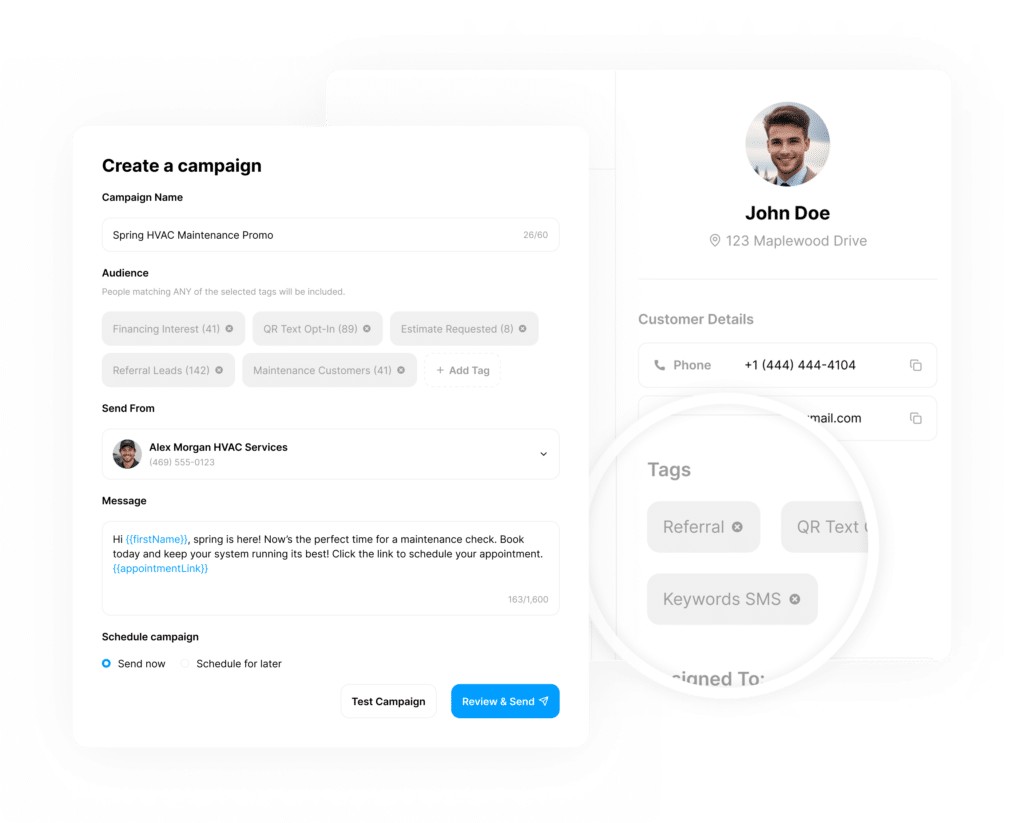
Tags are labels that Chatavise applies to contacts automatically based on what they do, how they respond, and what their history with your business looks like.
Once a contact is tagged, you can use those tags to send the right message to the right group, trigger the right workflow, and exclude the right people from campaigns that don't apply to them.
Your list organizes itself in the background. Your messages get more relevant. And the results improve without adding a single manual task to your office team's day.
ABOUT TAGGING
What Tagging Does for a Home Service Business
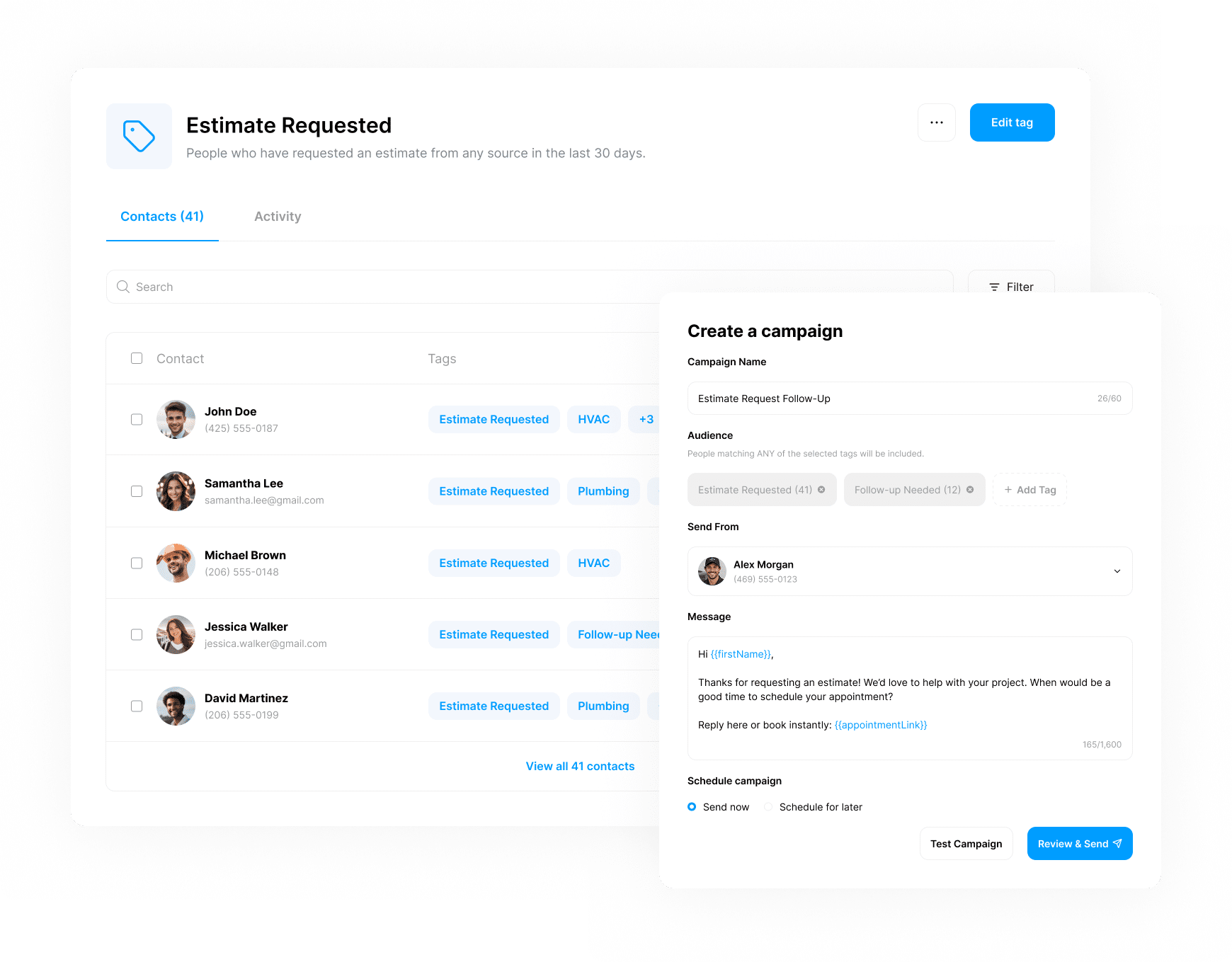
Tags are labels that Chatavise applies to contacts automatically based on what they do, how they respond, and what their history with your business looks like.
Once a contact is tagged, you can use those tags to send the right message to the right group, trigger the right workflow, and exclude the right people from campaigns that don't apply to them.
Your list organizes itself in the background. Your messages get more relevant. And the results improve without adding a single manual task to your office team's day.
SMARTER CUSTOMER SEGMENTATION
6 Ways Home Service Businesses Use Tags
Not every customer should receive the same message. Tags let home service businesses organize customers based on service history, satisfaction, booking behavior, and interest level so every follow-up feels relevant, timely, and intentional instead of generic.
Service Type Tags
Automatically tag customers based on the service they had. HVAC, plumbing, lawn care, and carpet cleaning customers all get tagged based on what was done.
Satisfaction Tags
Customers who respond positively get tagged while those who flag a concern get excluded from marketing messages until the issue is resolved.
Repeat Customer Tags
Repeat customers are different from those who haven't returned. Tagging them differently lets you acknowledge the relationship you've built.
Interested in Additional Services Tags
When a customer's survey response, conversation, or behavior signals interest in a service they haven't booked yet, they can be tagged automatically and added to a relevant follow-up sequence.
Inactive Customer Tags
Customers who haven't booked in a defined period get tagged so a re-engagement workflow can reach out at the right moment before they drift to a competitor permanently.
Do Not Market Tags
Customers with recent negative feedback are automatically tagged to exclude them from all marketing campaigns until the situation has been addressed.
AUTOMATICALLY UPDATED CUSTOMER DATA
How Tags Are Applied
Chatavise applies tags automatically so your team doesn't have to manage your contact list manually as it grows. Tags can be applied from:

Tags can be applied from survey responses, job completions in your field service system, workflow triggers, keyword opt-ins, web form submissions, tracked link clicks, and manual tagging by your team when the situation calls for it.
The result is a contact list that is always organized, always current, and always reflecting the actual state of each customer's relationship with your business without anyone having to maintain it by hand.
AUTOMATICALLY UPDATED CUSTOMER DATA
How Tags Are Applied
Chatavise applies tags automatically so your team doesn't have to manage your contact list manually as it grows.
Tags can be applied from survey responses, job completions in your field service system, workflow triggers, keyword opt-ins, web form submissions, tracked link clicks, and manual tagging by your team when the situation calls for it.
The result is a contact list that is always organized, always current, and always reflecting the actual state of each customer's relationship with your business without anyone having to maintain it by hand.
SMARTER AUTOMATION & COMMUNICATION
What You Can Do With Tags
Once your contacts are tagged, the possibilities open up across every part of Chatavise. Tags turn your contact list from a flat database into a living, organized picture of your entire customer base. And that picture is what makes every other feature in Chatavise work better.
-
Send Targeted SMS campaigns to specific customer groups so every message is relevant to the people receiving it.
-
Trigger Workflows Automatically when a tag is applied so the right follow-up happens at the right time without manual intervention.
-
Exclude Tagged Contacts from campaigns that don't apply to them so your communication always feels appropriate rather than random.
-
Personalize Messaging based on service history so long-term customers feel recognized and first-time customers feel welcomed.
-
Build Smarter Marketing Sequences that move customers through the right journey based on where they actually are.
SIMPLE TO SET UP, EASY TO USE
Here's Exactly How It Works
STEP 1
Add the Webchat widget to your website
A simple copy-paste install that works on any website. No coding required and no developer needed. If you can update your website, you can add Webchat.
STEP 2
Install it on any page
Put it on your homepage, your service pages, or anywhere visitors are likely to land. The widget is customizable so it matches your brand colors and greeting.
STEP 3
Visitors start a chat
A visitor sees the widget and clicks to start a conversation. The barrier to engage is as low as it gets. No account needed, no app to download, no form to fill out.
STEP 4
They enter their name and phone number
The visitor enters their contact information and asks their question or requests information. You now have a real lead with a real phone number attached to a real conversation.
STEP 5
You continue the conversation via text
The conversation moves to SMS immediately. It continues on their phone regardless of what they do next in their browser. Your team responds from the Consolidated Inbox alongside every other customer conversation.
MORE WAYS TO GROW
Check Out Related Features
Discover additional tools designed to help field service businesses streamline operations, improve customer experience, and drive growth.
Workflows
Tags and workflows work hand in hand. When a tag is applied, a workflow can fire automatically, sending the right message, triggering the right internal alert, or moving the customer into the right sequence without anyone having to do it manually.

Marketing Suite
Tags are what make Marketing Suite campaigns smart rather than generic. Instead of blasting your entire list, you send relevant messages to the right groups based on service history, satisfaction, and behavior. The difference in results is significant.
Your Customers Aren't All the Same. Your Communication Shouldn't Be Either.
A home service business running 10 or more jobs a day is building dozens of new customer relationships every week. Some of those relationships are just getting started. Some have been going for years. Some need attention. Some are ready to refer.
Chatavise Tagging makes sure you always know which is which and always have the right message ready for each one.
Book a demo today and see how tagging helps your business communicate smarter without adding any work to your team.
